TV World – Developer log

For each Ludum Dare, I like to change genres to keep things interesting. This time, I decided to create a classic shoot-em-up (aka shmup), since I’ve never developed one before. Since the theme was “Everything on One Screen”, I decided to make a television screen the protagonist of the game. I made the entire game based on adventuring through various television channels. I don’t believe anyone has ever done a television themed game before.

I started with the weather channel, which included snowmen as enemies, since the “Unicode Snowman” seemed to be a lock for the Ludum Dare 31 theme. Then after defeating the last snowman boss, you get a gray remote which takes you to the next channel, which is the “Sportsmania” sports channel. In this channel you must blast the numerous footballs which approach you. Defeating the mega sized football at the end grants another gray remote which takes you to the next channel. In the classic movie channel, it is entirely black and white themed and movie reels are the hazard. Along with the classic look, there is also classical styled music that plays in the background. The remaining channels are the 24 Hour News, Kids Club, Out of this World (sci-fi), American Pickers (country music), Ultimate Chef (cooking), and Furry Buddies (animals and pets). Each channel has its appropriate enemy types, which include dollar bills, lollipops, UFOs, cowboy boots, pizza slices, and kitties.

There are two power-ups in the game, which can be acquired by defeating enemies. The red remote will increase the player’s fire rate. This ability can be upgraded five times. The magenta remote will increase the player’s fire spread, which can be upgraded twice so that three projectiles are fired at once.

What Went Right

This was the first time I used the Playmaker addon for Unity for an official Ludum Dare entry. I did use Playmaker to create my Bag Boy warm-up entry, which I think turned out quite well for the amount of time that I spent on it. There is a steep learning curve to using Playmaker, but once you know how to use it, creating a game becomes much easier (especially 3D games). I didn’t write a single line of code for this game, which really makes the game development process less stressful. I was able to spend more time coming up with ideas, and implementing those ideas took much less time than if I was writing code. Managing the game engine is much simpler by creating the FSM diagrams and adding the appropriate actions. I used Taron’s Verve Painter again for creating the background, but I applied a pixel filter in Gimp to make to appear more television-like.

This time I also used an online tool called Trello, which was recommended in one of our local Knoxville Game Design meetings. It provides an efficient interface for recording tasks and ideas, and it allows you to mark which features have been implemented and completed. I think it’s more targeted towards team development, but I found it to be a useful tool while working solo.

I did a webcast to Twitch during the entire game development process. I am really happy with the results of my time-lapse video. My development desktop is on the left, with the current date and time below. On the right side, you can see me on the webcam and the IRC chatroom of my Twitch channel. I think displaying the chat room in the stream encourages people to comment on the status of my game.

What Went Wrong

The night before the competition started, I upgraded my Unity development environment to the latest version. This new version had a completely new UI system added, so I wasted a few hours trying to figure out how to get it to work. Then I discovered that the old GUIText and TextMesh components weren’t easily accessible, and the new UI components were not compatible with Playmaker. Therefore, I wasted even more time downgrading my Unity development environment to the previous version.

After that happened, things were going fairly smoothly. I did have a small problem getting the scrolling background working, because I forgot that the background plane size is 10×10 units. However, I had done a scrolling background for one of my previous games, so I was eventually able to figure it out.

Getting the bullets shooting correctly also took more time that I had anticipated. The bullets were shooting into the screen. Eventually, I took the approach where I set the initial rotation of a bullet, and then just translated it forward in the bullet’s local Z-coordinate.

I left all of the modeling for the last few hours of the competition. Honestly, I was proud of the number of models (the television model for the player and nine different enemies) that I was able to churn out in two to three hours. However, none of the models were animated.

The enemy AI is probably the most glaring flaw in the game. The enemies just basically go from right to left on the screen at a constant rate. I could have easily made the enemies move at different speeds. Making the enemies movie in different patterns, and having the enemies shoot back are definitely features I would like to add in an upcoming release.

The power-up system was completely unbalanced as well. I used a simple random variable to determine if an enemy would drop a power-up. This meant that sometimes you could go long stretches without getting a power-up, and then other times you may get multiple power-ups in a row. Additionally, after maxing out your power-ups, you would complete the game by simply holding down the spacebar. For the next competition, I will try to devote a little more time towards balancing the game.

I liked the music that I made for the game, however I could have spent more time on it. I basically combined various Apple loops in Garage Band, while also modifying the speed and pitch. I read the Ludum Dare rules and this is apparently acceptable, but I really like to be the one entering the notes for it to feel like my own.

How Did I Do?

I don’t know. After Ludum Dare 27 I quit checking my rankings. I check the top 100 winners list, so if I’m not on there it really doesn’t matter to me.

Where to Go From Here

I think I’ve developed a solid shoot-em-up engine, so I just need to add new power-ups, more enemies, smarter artificial intelligence, and increase the length of the channels (levels). I would like to add a money system to the game so that the player can buy new power-ups and abilities.

Earlier this month, I released One Gunman, another one of my Ludum Dare games, on the Windows Store. That’s definitely a platform I would consider releasing TV World. I already know the process for putting a Unity game on the Windows Store, which isn’t too difficult. However, I found that it is really easy to get lost in the shuffle on that platform and getting sales can be tough.

I would definitely like to release the game on the XBox One, since the XBox Live Indie Game (XBLIG) marketplace is pretty much dead. However, getting approved to develop for the XBox One is much more cumbersome than XBLIG, since you’ve got to pitch your idea and go through a lengthy approval process to get a development kit. However, I’m hoping that my experience with publishing to the Windows Store will prove useful for publishing on the XBox One, since they are supposedly based on similar operating systems.

There’s always mobile platforms, such as iOS and Android. I’ve made a simple build for my Nexus Android tablet, but the controls really need some work, which requires more time. I created some simple virtual buttons, since obviously a tablet doesn’t have a keyboard. However, virtual buttons work differently than a mouse, keyboard, or joystick because they are touch based.

I know others have had success with publishing games to the Playstation Vita, so that is another paltform I may give a try. There’s also other less popular consoles like the Ouya, but the cost of the developer’s license is usually my deciding factor.

Then there’s always ad revenue sharing sites like Game Jolt and Kongregate. These web sites are fine, but I’ve never made any serious profit from them. Thefore, I’ll probably release the compo version on those sites, and save the improved version for other platforms.

I am also considering Desura, since the cost to publish on their service is low or free if I remember correctly. I would consider submitting to Steam Greenlight, but honestly 100 dollars is a lot to invest if there’s no guarantee that your game will ever get published on the service. However, that money is supposed to go to charity, so I wouldn’t feel to bad about making that investment.

You can play the compo version of TV World from my itch.io page.
 

Archaeology – Developer log

With the weather being so nice outside last weekend, it was really hard to get psyched about sitting in front of the computer all weekend to make a game. However, I’ve participated in every Ludum Dare and mini-Ludum Dare since #26, so I felt compelled to make something even if it was really simple. I really didn’t have any good ideas for “Beneath the Surface”, so I decided to create a treasure hunting game. For my LD29 warmup, I made a simple MineSweeper game, so I thought it would be neat to expand on the basic concepts of that game. Instead of avoiding mines, you are trying to find buried treasure in a three dimensional world.

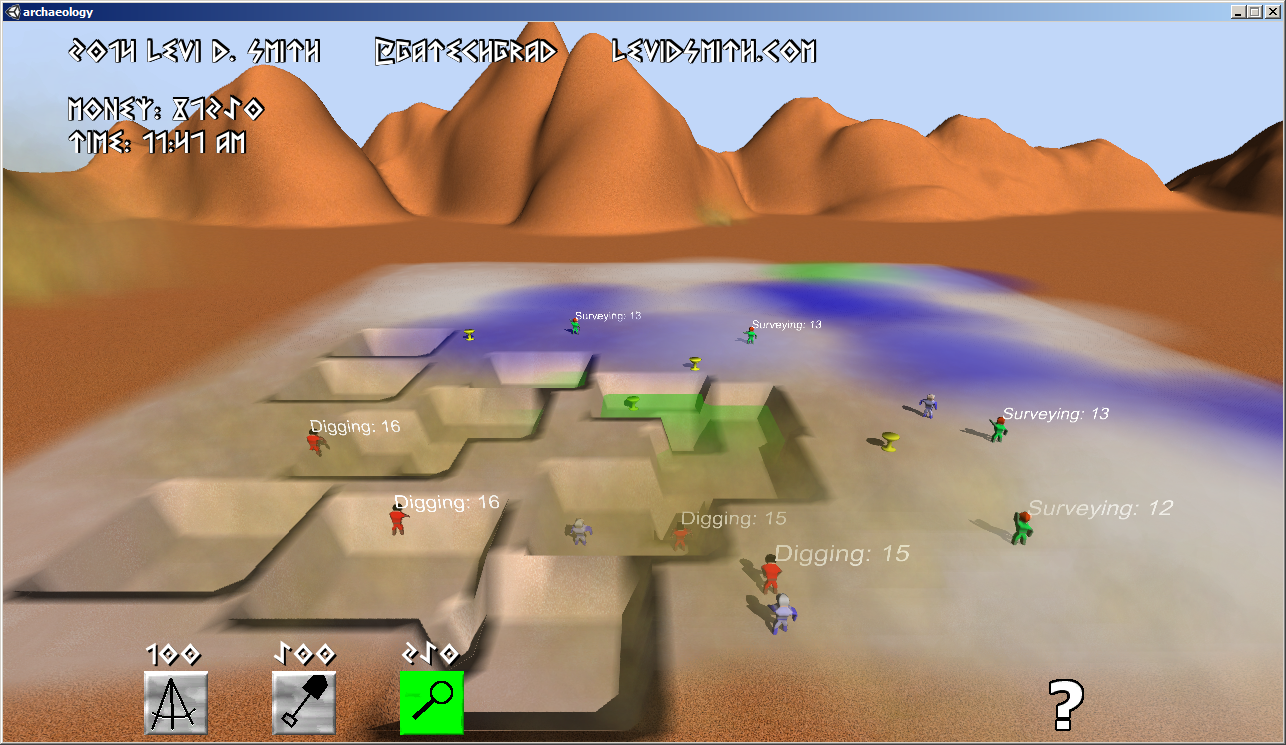
At first I just got the hidden treasure pieces to randomly populate on the game world, which are the items you must find. The digging unit was the first that I created, which I renamed “excavator” since it sounds fancier. He just uncovers whatever is hidden at his location. However, randomly adding excavators to the map really didn’t seem challenging.

Then I got the idea to allow the player to “ping” the map to get a general idea of the treasure location. This reminded me of the news stories about crews using scanning devices to find the missing Malaysian airplane off the coast of Australia. I originally wanted to have a heat map showing the pinged locations and the amount of treasure in the area. However, I had to settle for just colored circle areas on the ground representing the amount of treasure in the area. It was fitting that this is very similar to the job that an archaeological surveyor does, so I created a “surveyor” unit specifically for this job.

Finally, an excavator only knows about digging, and only a true expert would know the value of a lost treasure. Therefore, I created the “appraiser” unit to determine the value of each discovered treasure. The inspiration of this unit came from shows like Pawn Stars and American Pickers, where they will call in an expert to determine the value of a given “piece”.

I had plenty of more ideas which had to be cut. There was going to be rocks on the game world and an explosives expert unit which would destroy the rocks so that the excavator could dig. I also did a little research on some of the most famous lost archaeological artifacts from around the world, which I wanted to include in my game. However, I just had enough time to include one treasure piece which looks like a golden chalice. I also got suggestions to add adversaries like spiders, floods, and diseases which could eliminate units, but I didn’t have time to include any of those.

For this game, I wasn’t too worried about creating the best looking game ever. In my previous Ludum Dare entries, I spent much more time polishing, but it never seemed to have much of an impact on my ratings. I’m much less concerned about ratings this time, and more focused on learning new things. For example, this time I got fully functional map controls working with the mouse, including zoom in/out with the mouse wheel. I figured out how to create a unit on the game world at the position where the player clicks. When implementing that feature, I got stuck when trying to cast a ray from the camera to the plane on the ground. For some reason, none of the camera API calls were working. I thought my Unity libraries may have gotten hosed or there was some issue with the compiler. After taking a break and coming back to it, I realized that on the title screen I had created a script called “Camera” for moving the title camera. All calls to camera were referring to that script, which explained why I could not access any of the Camera API methods. Changing the name of my title camera script resolved that problem.

Another issue was with the appraisers. Since the player could add an appraiser at any location in the world, the appraiser would need to walk to the nearest treasure. I did learn that I can access all of the Treasure objects by tagging them with “treasure” and then calling the GameObject.GetObjectsWithTag method. This also resolves a Unity problem that I was never able to figure out, which is referencing game world objects (in the Hierarchy) from a Prefab.

I will admit that there are some things that I’ve done so many times when creating a Unity game, that it just isn’t fun anymore. One of those things is creating human models. Unfortunately, in the 48 hour compo pre-existing assets are not allowed, so I had to create a human model from scratch again. I guess it’s good for the Blender practice. I used one model for the three different units, but used a different texture and animation for each unit. I originally started by creating the excavator with a shovel, but I found that it was going to be way too difficult to animate the character with the object, so the shovel was removed.

In the end, I got most of the basics working but it really didn’t look like a completed game. There was a bug which sometimes prevented the appraisers from collecting treasures. After looking into it some more, I found that this was because I thought that code execution stopped when Destroy was called on a gameObject. Actually, the script attached to a gameObject will continue until the Update method finishes. In my code, the appraiser was targeting the next treasure after Destroy was called, so that no other appraisers could target the treasure and appraise it. That was a simple one line fix to solve.

The biggest mistake that I think I made in this Ludum Dare was spending to much time basically re-inventing the wheel. I really don’t like the default Unity GUI buttons, so I decided to make my own. However, the process of making custom buttons is not a trivial one and is time consuming. Before the next Ludum Dare, I would like to have my own personal Unity library for things like graphical toggle buttons, menus, camera controls, font outlines, and dialog boxes. That way I could spend more time making the game, rather than trying to get a button to illuminate.

I liked the concept of this game, because I haven’t seen it done before. Therefore, I spent a little time this weekend making some changes for the Post-Compo version. I looked into how to modify the Unity terrain at run-time, so now when the excavators dig, it actually makes a dip in the terrain which is what I had originally envisioned. The biggest problem I ran into is that the terrain map starts at 0 height, so there was no way to make the terrain go any lower. Setting the base terrain level to 300 fixed this problem, and I just subtract 0.005 from the terrain height where the excavator digs. It took me a little while to figure out that the height array is from 0 to 1, not actual world units.

Overall, I’m happy with the results of this game. It definitely isn’t as visually impressive as my previous Ludum Dare entries, but I think the gameplay is much deeper. Adding adversaries to the game would probably make it much more exciting. If there is enough interest, I would be willing to port it to other platforms, since I think it would make a great mobile game. Online features such as leaderboards would also be nice to have. If I ever felt really ambitious, I could have an online server containing treasure data for everyone playing the game, so everyone is excavating from the same online world.


Videos

Tex Oneman – Developer log

Tex Oneman is my third official Ludum Dare entry, and it was my eleventh game developed for this site (including mini-LDs and warm-ups) since I registered in April 2013. I feel like I’ve learned a lot during that time, and these projects have definitely made me a better Unity developer. For this Ludum Dare, I knew I wanted to do something different.

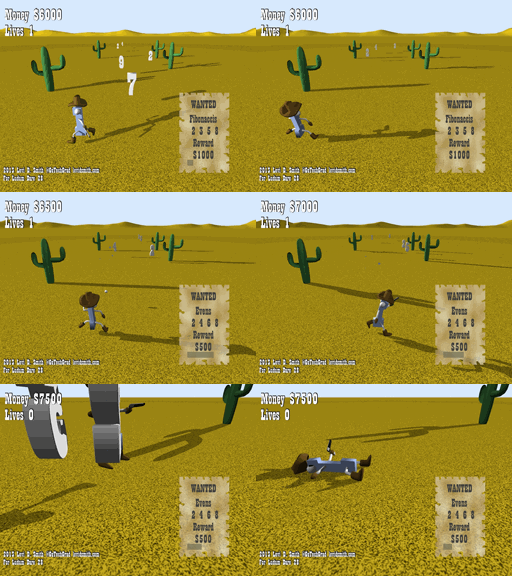
After hearing the theme announced at our local Knoxville Game Design meetup, I knew I wanted to make the number “one” a central part of the game. Going with that approach, I decided to make the number “one” humanoid, since I knew how to quickly make meshes from text in Blender. I added eyes, arms, and legs, but the character was still sort of boring. I thought about some of the characters in my latest XBox Live Indie game TTY GFX ADVNTR, and remembered the character “Needles”, which is a humanoid cactus wearing a cowboy hat. Then I remembered playing the classic game GunSmoke at one of those 20-in-1 arcade machines not too long ago. There really haven’t been too many western themed games lately. Therefore, I gave my humanoid one a cowboy hat, boots, and a gun to shoot. I also went ahead and modeled a cactus in Blender as well as a background prop.

Tex Oneman gameplay

Another classic western game was Wild Gunman. I liked the Gunman name, so I decided to call this game “Tex Oneman”. The original name (One Gunman) was also sort of a play on the term “Lone Gunman”, which differs my game’s title name by just the leading “L”.

After creating the models, I got the main character imported into Blender and moving around. I also created some enemy boxes that moved around. Next, I implemented shooting projectiles. However, I quickly found that trying to aim on the X-Z plane with no lock-on could be quite difficult. Therefore, I limited the character to just being able to move left and right, and he is only able to shoot forward. This makes the game similar to other classic arcade shooters, except this game uses a third person view instead of a top-down birds eye view. Shooting enemies was fine, but it still seemed really boring.

Then I had the idea that Tex Oneman would shoot number sequences as the targets. For each enemy, I assigned a random digit value in the range of 2 through 9. First I decided to use evens and odds as the requirements. Once I got those working, I added a countdown so that the requirement would change periodically. I was really inspired by a game called Pig and Bullet, which makes the player switch between collecting red and blue bullets every few seconds. The problem with that game was that you never knew when the objective would change, so I added a visible countdown in my game. New objectives were added, such as Fibonaccis (2 3 5 8), Squares (4 9), and Perfects (6). I didn’t include 1 in the sequences, because that would mean that Tex Oneman would be wanted as well causing unneeded confusion. Each sequence also has a set reward associated with it, where the more complex sequences have higher reward values. For the lose condition, I made it so that the player lost a life if they run into a number or shoot an incorrect number. Finally, I rendered 3D numbers in Blender, which replaced the box enemy meshes in my game. I included statistics such as number of shots and accuracy percentage on the game over screen, which was inspired by other classic arcade shooters.

Since I had the core engine finished on the first day, I worked on polishing the game on the second day. A “WANTED” poster was added which displays the current objective in the lower right portion of the screen. The objective change countdown was converted into to a bar which shrinks as it nears zero. Like my previous entries, I used Garage Band on my laptop to make the music for the game. The piano and guitar sounds were primarily used to give the game a more western feel. Bxfr was used again for making the gunshot and other sound effects. Using my computer microphone, I recorded myself saying “Shoot X”, where X is the current objective. Then, the vocal recordings were modified a bit in Audacity to give it a better sound. The voice seems to really enhance gameplay, since it keeps the user’s attention on shooting the numbers, instead of looking at the Wanted poster. Finally, particle effects were added using a star texture that I made in Gimp. I tried changing the particle system color over time, but for some reason it just wasn’t working for me.

https://soundcloud.com/gatechgrad/sets/one-gunman

I learned a few lessons from this game. The first lesson is that people don’t like shooting at a perspective. I thought the controls were intuitive, but some people definitely found it difficult to shoot. The best I can explain the shooting controls is that it is similar to rolling a bowling ball on a bowling lane. The game could have included some additional visual cues to help line up the shots down range. I could have also used a top-down view, but then the player would not be able to see the details of the model that I had created. Using an orthographic projection may have helped as well, which would have kept the numbers and bullets traveling vertically on the monitor screen. Another option would be to highlight the number that the player is currently targeting, but I thought that may make the game too easy.

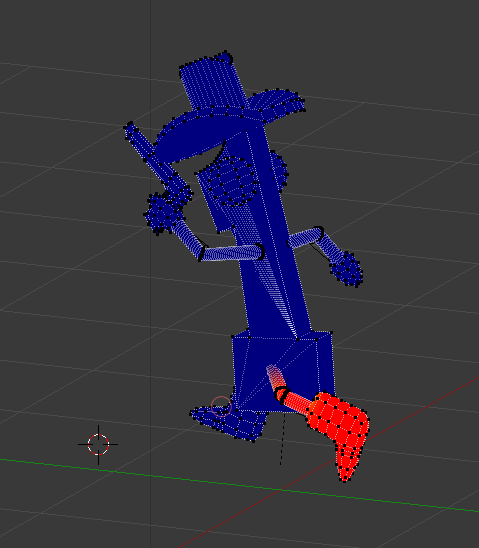
There was also some difficulty with getting the model moving correctly. When I assigned the armature, I used the default “with automatic weights” that I always use in Blender. However, since the arms and legs were so skinny, it didn’t properly weight paint all of the vertices. I’ve done manual weight painting before, but this model had some difficult to reach vertices. After some trail and error, I discovered that it is possible to pose the model while weight painting it. This made reaching some of the difficult to reach vertices much easier, and you can see the vertices snap into place while weight painting it.

Overall, I am satisfied with the game that I have created. I would have liked to made the other numbers humanoid as well, and I really needed to add more props to the environment. Things like buildings, dust, and tumbleweed could have really added to the environment. If I get the time to work on this game some more, I definitely think it could be turned into a great game.